Review with less guesswork
Face comparison supplies a consistent signal alongside the photographs your team already reviews.
Do these photos show the same person?
Different poses, lighting and backgrounds make photo-set review harder. Similarity Detection compares eligible faces within the set you submit and returns evidence for individual pairs. Give reviewers a clearer picture of where the photos agree, where they differ and which images cannot be compared.
Compare faces within a submitted photo set and see which comparisons agree or need attention.
Face comparison supplies a consistent signal alongside the photographs your team already reviews.
Pair-level evidence helps reviewers identify disagreement instead of treating the whole set as an unexplained rejection.
A missing face, multiple faces or an unavailable comparison remains an explicit result, ready for a retry or review.
Compare the submitted set, rather than searching a stored customer population or national identity database.
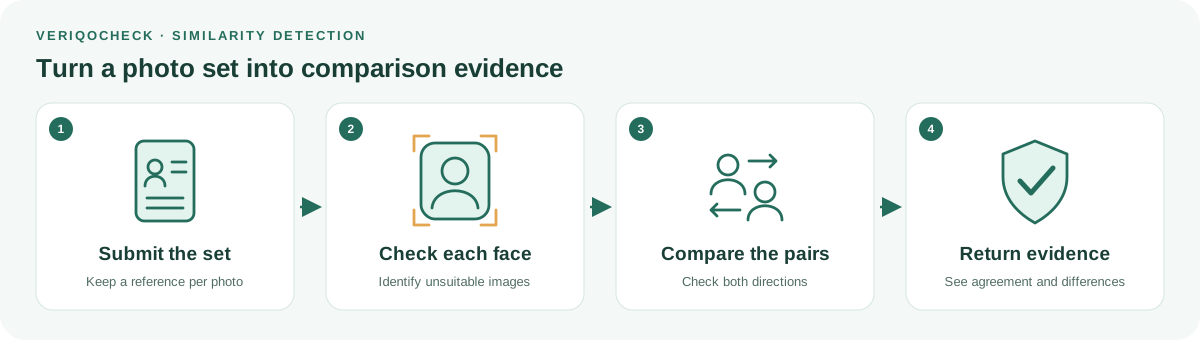
Give each image a reference and check that an eligible single face is available.
Assess the eligible pairs under the configured similarity policy, rather than assuming agreement carries through the set.
Read overall and pair-level outcomes, then request better images or review the affected comparisons.
If photo A resembles B and B resembles C, that does not establish agreement between A and C. Assess the required pairs under the applicable policy rather than assume similarity is transitive across the set.
An unsuitable photo or an unfinished comparison should not look like agreement. Use explicit image problems and comparison states to guide retries, assisted review and supported batch-selection workflows.
AI compares facial evidence within the submitted photo set. Returned confidence is a model score, not a probability of genuine identity.
Our AI and verification approach →A similarity score is model evidence, not a probability of genuine identity. This product does not establish document authenticity or live presence. Comparison access and deployment configuration must be confirmed before activation.
Africa first means starting with the markets, documents and devices your customers use. Coverage and capture readiness are confirmed for your deployment; no universal document support or guaranteed compliance is implied.
No. The scope is the submitted photo set. It is not a population search or government identity lookup.
No. A score is comparison evidence, not a probability of genuine identity. Document authenticity and live presence need their own checks.
Appropriate service access and deployment configuration are required. Confirm readiness and supported inputs for your use case before activation.
Share the photo sets you need to compare and the decisions your reviewers need to support.
Get started with VeriqoCheck